Handling multi-tenant data
Luzmo can be used for all sorts of multi-tenant data configurations, from one single database with multi-tenant data to multiple single-tenant databases. In this section you'll find more details on the different solutions and how to easily set them up.
Introduction
Depending on your current data setup and use case, it might be necessary to dynamically:
apply row-level filtering in case you have one dataset with multi-tenant data
Parameter filtering point towards a different data source in case you have one dataset per tenant
Specify connection overrides (account_overrides) route each tenant to its own table or query, with tenant-specific columns and formulas
Custom fields per tenant
No worries if your specific data setup is not covered by these options, via e.g. a plugin any data setup can be supported.
Parameter filtering
If you want to embed a dashboard that has access to a multi-tenant dataset which requires row-level filtering, you can apply parameter filters to the dataset and override these parameters when requesting an embed token for a specific user in your application. This is useful if you would like to maintain one dataset for all your clients and make sure that each of them only has access to their relevant data.
Add a parameter filter
First you need to create and define an Parameter filter, after which you can override it via the parameter_overrides property to a value of your choice when creating the authorization request.
A Parameter filter can be defined on the dataset level or on a specific dashboard.
For multi-tenant row-level security, you should set up the embed filter on the dataset level to ensure the user cannot alter or remove the filter in e.g. the embedded dashboard editor.
Define a parameter filter on the dataset level using an embed filter group
You can specify static and/or parameter embed filters on each dataset. Parameter filters ensure that you can dynamically fill in the filter value based on the user logged in in your application in the authorization request.
These embed filters can be setup from the Luzmo user interface or via the API.
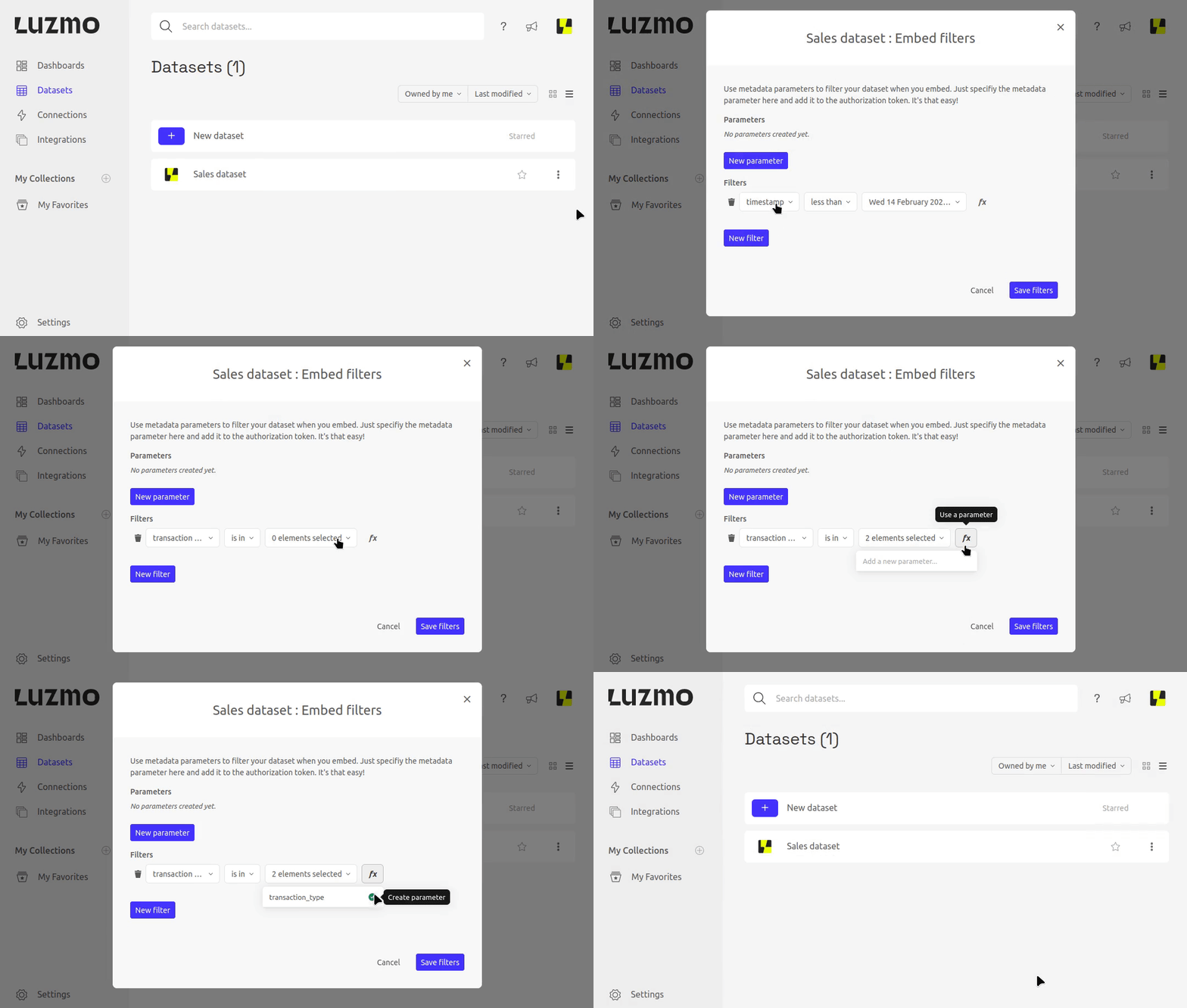
To set up an embed filter via the API, you should link a dataset to an embed filter group and specify the static and/or parameter filters. Parameter filters can be overridden when requesting an embed token to apply dynamic row-level security.
In the snippet below, fill in your API key & token and add the dataset, embed filter group and filter details.
Create your API key & token in Luzmo in your profile settings .
import Luzmo from '@luzmo/nodejs-sdk';
const client = new Luzmo({
  api_key: '<your Luzmo API key>',
  api_token: '<your Luzmo API token>',
  host: 'https://api.luzmo.com'
});

const response = await client.associate('embedfiltergroup',
  '<your entity id>',
  { role: 'Securables', id: '<your dataset id>' },
  {
    filters: [

      {
        clause: "where",
        origin: "global",
        securable_id: "<dataset id>",
        column_id: "<column id of a column used in the dataset>",
        expression: "? in ?",
        value: {
          parameter: "metadata.<parameter name>",
          type: "array[hierarchy]",
          value: [
            "<default parameter value>"
          ]
        }
      }
    ]
  }
);
Define a parameter filter on a dashboard
Instead of defining the parameter on the dataset, you can also do this on a dataset (or even a specific chart) inside a dashboard. This makes it easy to get a preview of how the dashboard would look like for your end user. Next to that, it can also give you a good indication of the embedded dashboard's loading performance.
Keep in mind that if you gave "use" or higher access to the dashboard, an embed user with access to this dashboard is able to duplicate or modify the dashboard and thus can remove the parameter filter from the dashboard.
To prevent this, you should specify the parameter filter on the dataset as explained above.
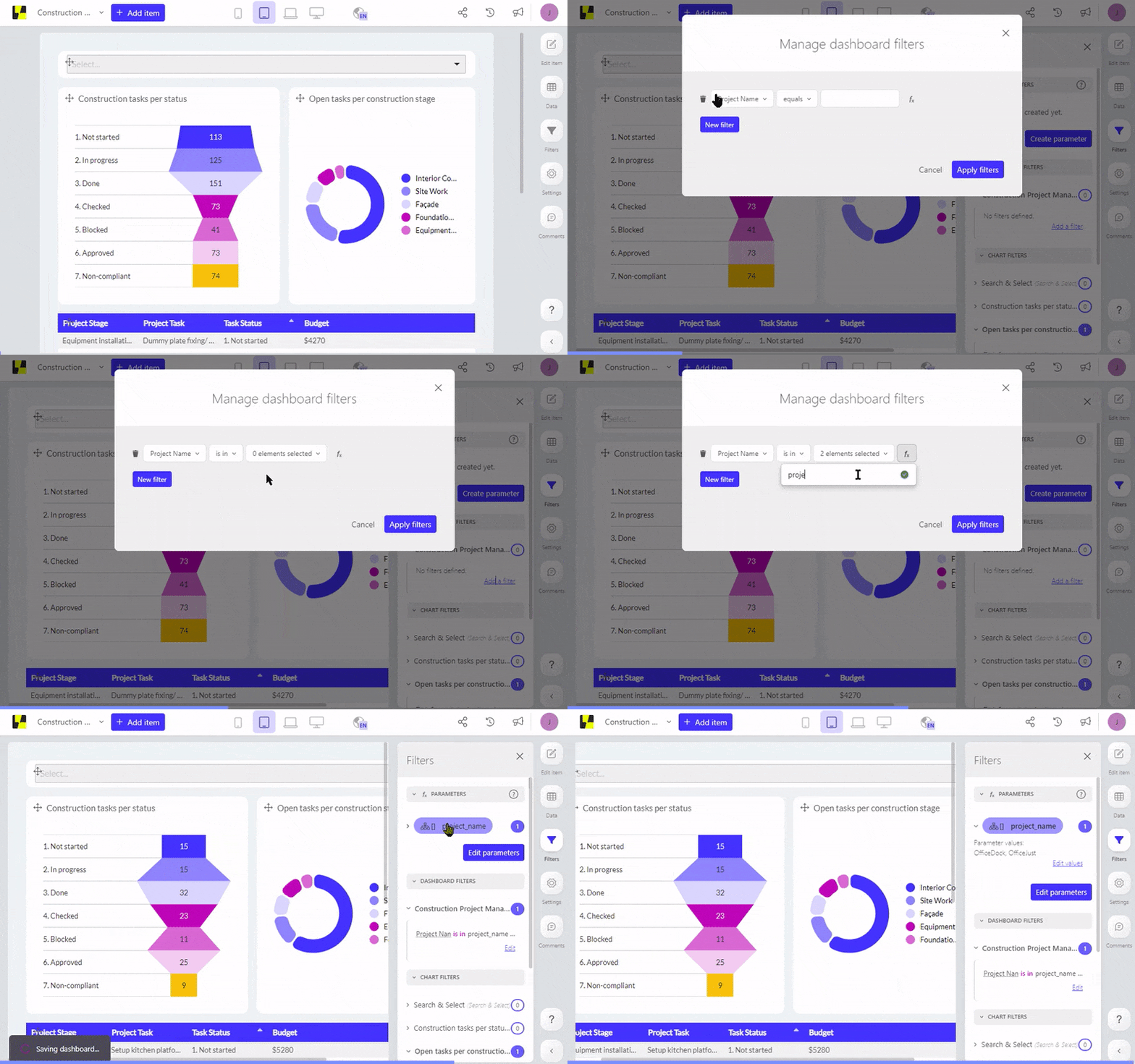
You can create a parameter filter when setting up a filter on the dashboard or widget level, and clicking on the parameter icon instead of using a static value. This will automatically create and use this parameter in the filter.
Alternatively, you can also use the "Create parameter" button to create a new parameter with a suitable type, and use it in one or more filters.
Any created parameter can be reused in multiple widget or dashboard filter.
Override the parameter in the authorization request
You can add parameter_overrides to your authorization requests to dynamically override a parameter filter and filter the data in your embedded dashboards.
To clear a Parameter, meaning to not apply the filter(s) using that parameter, you should use the special value {"clear", true} .
In the snippet below, fill in your API key & token, add the user's details and the resources (collections, dashboards and or datasets) you want to give access to. Additionally, specify the parameter name together with the value. This will override the default value you specified when setting up the parameter filter.
import Luzmo from '@luzmo/nodejs-sdk';
const client = new Luzmo({
  api_key: '<your Luzmo API key>',
  api_token: '<your Luzmo API token>',
  host: 'https://api.luzmo.com'
});


const response = await client.create('authorization',
  {
    type: "embed",
    username: "<A unique and immutable identifier for your user>",
    name: "<user name>",
    email: "<user email>",
    suborganization: "<a suborganization name>",
    access: {
      collections: [

        {
          id: "<collection_id>",
          inheritRights: "use"
        }
      ]
    },
    parameter_overrides: {
      Country: [
        "Spain"
      ],
      <parameter name>: [
        "<value to apply>",
        "<other value to apply>"
      ],
      <parameter to clear>: {
        clear: true
      }
    }
  }
);```
This returns a JSON object with an id/token combination that we will use in the next step to securely embed the Luzmo content in your application/platform:
{
  "type": "embed",
  "id": "< the embed authorization key >",
  "token": "< the embed authorization token >",
  "user_id": "< a uuid used on Luzmo's end to identify the embed user >"
  // ...
}
For a list of all properties that you can use in the request, check the full Authorization reference in the Core API.
Connection overrides
Your data may be split over databases per client. In such case, you can create multitenant dashboard in Luzmo using the connection overrides (account_overrides) functionality. A connection in Luzmo contains the information that is necessary to access a certain data source. The connection overrides (account_overrides) functionality allows you to dynamically override one or multiple of these properties.
You can override the connection properties when requesting an embed authorization token to switch between databases, schemas, etc. You could also use this approach to change the user/password in a single database in case your database provides row-level security. Row-level security in this context means that the database will automatically filter out rows based on the credentials used to query.
You can use connection overrides if you are using one of the standard Luzmo connectors (MySQL, PostgreSQL, ...) as well as if you are using a Plugin to connect your data.
Depending on whether the connection is a standard database connection or a plugin the format of the connection override varies. Depending on the datasource, different usage patterns may exist.
In the snippets below, fill in your API key & token, add the user's details and the resources (collections, dashboards and or datasets) you want to give access to. Additionally, specify the connection override you want to apply.
You can find the connection id by going to the Connections tab in Luzmo. Look for your data connection, then click on the three dots to the right of the connection name and select "More Info."
Connection overrides for a standard Luzmo connection
Depending on the datasource, different usage patterns may exist.
Check the examples in the Core API Create Authorization endpoint documentation for an example per data source .
import Luzmo from '@luzmo/nodejs-sdk';
const client = new Luzmo({
  api_key: '<your Luzmo API key>',
  api_token: '<your Luzmo API token>',
  host: 'https://api.luzmo.com'
});


const response = await client.create('authorization',
  {
    type: "embed",
    username: "< A unique and immutable identifier for your user >",
    name: "< user name >",
    email: "< user email >",
    suborganization: "< a suborganization name >",
    access: {
      collections: [

        {
          id: "<collection_id>",
          inheritRights: "use"
        }
      ]
    },
    account_overrides: {
      <your connection_id>: {
        host: "<The new database host URL to connect to>",
        user: "<username>",
        password: "<password>"
      }
    }
  }
);
This returns a JSON object with an id/token combination that we will use in the next step to securely embed the Luzmo content in your application/platform:
{
  "type": "embed",
  "id": "< the embed authorization key >",
  "token": "< the embed authorization token >",
  "user_id": "< a uuid used on Luzmo's end to identify the embed user >"
  // ...
}
For a list of all properties that you can use in the request, check the full Authorization reference in the Core API.
Connection overrides for a plugin connection
You can also use connection overrides (account_overrides) to override the properties of the following built-in plugins: AWS Athena, BigQuery, Clickhouse, Databricks, Elasticsearch, MongoDB, Oracle and Snowflake. Depending on the datasource, different usage patterns may exist.
Check the examples in the Core API Create Authorization endpoint documentation for an example per data source .
Additionally, you can also override the connection of your own custom build Plugin .
import Luzmo from '@luzmo/nodejs-sdk';
const client = new Luzmo({
  api_key: '<your Luzmo API key>',
  api_token: '<your Luzmo API token>',
  host: 'https://api.luzmo.com'
});


const response = await client.create('authorization',
  {
    type: "embed",
    username: "< A unique and immutable identifier for your user >",
    name: "< user name >",
    email: "< user email >",
    suborganization: "< a suborganization name >",
    access: {
      collections: [

        {
          id: "<collection_id>",
          inheritRights: "use"
        }
      ]
    },
    account_overrides: {
      <your connection_id>: {
        properties: {
          < custom authentication property ID >: "< the new custom authentication property value >"
        }
      }
    }
  }
);
This returns a JSON object with an id/token combination that we will use in the next step to securely embed the Luzmo content in your application/platform:
{
  "type": "embed",
  "id": "< the embed authorization key >",
  "token": "< the embed authorization token >",
  "user_id": "< a uuid used on Luzmo's end to identify the embed user >"
  // ...
}
For a list of all properties that you can use in the request, check the full Authorization reference in the Core API.